
AntiVirus PRO Android Security - Google Play
You'll be able to see results in few seconds.
Publisher Description
🎊
Limited time offer for the New Year – 50% off. Get it NOW!
🎊
(Offer valid 12.29.2016 05:00 EST until 01.05.2017 05:00 EST)
Get AVG AntiVirus PRO Android™ Security now for premium, full featured protection from viruses, malware, spyware and online exploitation in real-time.
Download NOW
with just an easy 1-time payment and join over
100,000,000
people who already installed AVG’s antivirus mobile security apps!
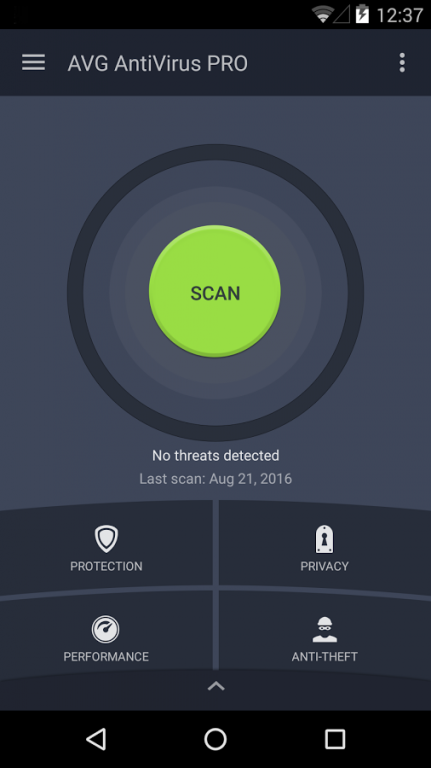
With AVG AntiVirus PRO Android Security you can:
★ Scan apps and games in real-time
★ Enable locating your lost phone via Google Maps™
★ Kill tasks that can slow down your phone
★ Monitor & Optimize battery, storage and data package usage
★ Hide your most-private photos in an encrypted Vault
In addition, when installing the premium app, you also get:
★ App Lock - password protection for sensitive apps
★ App Backup - backup apps to your SD card
★ Camera Trap - discreetly emails you a photo of anyone trying to unlock your phone
★ Device Lock - locks your phone whenever the SIM card is replaced
App Features:
Protection:
★ Scan apps and games for malicious content
★ Scan websites for harmful threats and get redirected to “Safe Page” when a threat is detected (Android's default browser and Chrome and OS older than 6.0)
Performance:
★ Monitor battery consumption to optimize and save power
★ Kill tasks and processes to help boost speed
★ Keep track of your mobile data plan usage
★ Optimize storage space (internal and SD card)
Anti-Theft:
Use AVG AntiVirus PRO Android Security together with AVG’s remote management console or text messages (SMS) to:
★ Locate your lost phone via Google Maps
★ Lock your phone and set a lock screen message to help the locator find you
★ Make your phone shout (ring) even if it is on silent mode
★ Wipe your phone and SD card content
★ Camera Trap [30-day trial]: discreetly emails you a photo of anyone who enters 3 wrong passwords when trying to unlock your phone
★ Device Lock [30-day trial]: automatically locks your phone whenever the SIM card is replaced
Privacy:
★ Hide private photos in a password-protected Vault to prevent others from snooping on your memories
★ App Lock [30-day trial]: lock sensitive apps to protect your privacy and safety or lock your phone settings to secure its configuration
★ App Backup [30-day trial]: backup apps to your SD card
★ Call and Message Blocker: protect yourself against spammers, hackers and scammers. Get warned about suspicious text messages, filter and block unwanted calls and messages (SMS Blocker isn’t available for devices with Android v4.4 and newer)
★ Delete call history, clipboard content and browsing history (Chrome)
★ Wipe contacts, text messages, photos, browser history, calendar, format SD card and restore device to factory settings
AVG AntiVirus PRO Android Security is available in 33 languages.
By installing/updating this app, you agree that your use of it is governed by these terms:http://m.avg.com/terms
Google®, Google Maps™ and Android™ are trademarks of Google, Inc., registered in the USA and in other countries
About AntiVirus PRO Android Security
The company that develops AntiVirus PRO Android Security is AVG Mobile. The latest version released by its developer is 1.0 .
To install AntiVirus PRO Android Security on your Android device, just click the green Continue To App button above to start the installation process. The app is listed on our website since 2016-12-20 and was downloaded 0 times. We have already checked if the download link is safe, however for your own protection we recommend that you scan the downloaded app with your antivirus. Your antivirus may detect the AntiVirus PRO Android Security as malware as malware if the download link to org.antivirus is broken.
How to install AntiVirus PRO Android Security on your Android device:
- Click on the Continue To App button on our website. This will redirect you to Google Play.
- Once the AntiVirus PRO Android Security is shown in the Google Play listing of your Android device, you can start its download and installation. Tap on the Install button located below the search bar and to the right of the app icon.
- A pop-up window with the permissions required by AntiVirus PRO Android Security will be shown. Click on Accept to continue the process.
- AntiVirus PRO Android Security will be downloaded onto your device, displaying a progress. Once the download completes, the installation will start and you'll get a notification after the installation is finished.
Program Details
System requirements
Download information
Pricing
Version History
version
posted on 2016-12-20
* Enhancements and bug fixes,* If you enjoy our app and find it helpful, please help us by star rating it (1 star=bad – 5 stars=good). Thanks for your support!,* If you’re still downloading our app and haven’t used it yet, please wait before star rating it
version 2.7
posted on 2011-03-28
Several fixes and updates
Disclaimer
Official Google Play Link
We do not host AntiVirus PRO Android Security on our servers. We did not scan it for viruses, adware, spyware or other type of malware. This app is hosted by Google and passed their terms and conditions to be listed there. We recommend caution when installing it.
The Google Play link for AntiVirus PRO Android Security is provided to you by apps112.com without any warranties, representations or guarantees of any kind, so access it at your own risk.
If you have questions regarding this particular app contact the publisher directly. For questions about the functionalities of apps112.com contact us.
